
Quick Answer
Start a smart home by choosing one ecosystem first, Amazon Alexa, Google Home, or Apple HomeKit, since this decides which app and voice assistant you will use daily. Then add one or two simple devices, such as a smart plug or smart bulb, in a single room before expanding. Look for devices supporting the Matter standard, which lets gadgets from different brands work together regardless of which ecosystem you choose.
Step 1: Choose Your Ecosystem First
Your ecosystem is the voice assistant and app world your devices will live in, and it is the single most important decision in a smart home setup. Amazon Alexa offers the widest device compatibility and cheapest hardware, making it a safe default for most beginners. Google Home suits households already using Android and Google apps, with strong natural language understanding. Apple HomeKit prioritises privacy and integrates closely with iPhones, though it typically supports fewer devices at a higher price point.
What the Matter Standard Actually Does
Matter is a smart home standard that allows devices from different brands to work across Alexa, Google, and HomeKit simultaneously, reducing the risk of getting locked into a single ecosystem. As of 2026, Matter support is well established on smart plugs, light bulbs, switches, locks, and thermostats, though camera and video doorbell support is still rolling out and not yet widespread. When choosing between two similar devices, picking the Matter-certified one is generally worth it, without paying a large premium purely for the badge.
Step 2: Start With a Hub or Smart Speaker
A smart speaker or dedicated hub acts as the central point that lets you control other devices by voice or app and set up automations between them. For most beginners, an Alexa Echo or Google Nest speaker doubles as both a speaker and a hub, avoiding the need for a separate device early on.
Step 3: Add One or Two Simple Devices
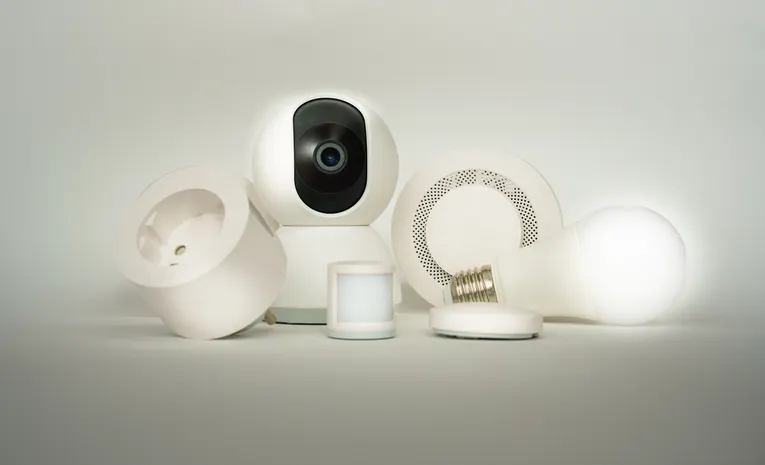
- Smart plugs, which add remote control and scheduling to ordinary lamps or appliances without any wiring
- Smart bulbs, offering adjustable brightness, colour, and scheduled lighting scenes
- Smart sensors, such as door or motion sensors, useful for basic automations and security awareness
Choosing the room you use most, often a living room or kitchen, is generally the easiest place to notice whether a device genuinely fits your routine before expanding further.
Step 4: Keep Devices Within the Same Brand Where Possible
Adding a smart plug from the same brand as your existing speaker usually means one fewer app to manage and better out-of-the-box compatibility. A cluttered smart home with devices spread across many separate apps is one of the most common reasons beginners abandon the setup, so keeping things consolidated matters more than it might seem.
Step 5: Set Up a Simple Automation
Once your first devices are connected, try one or two basic automations, such as lights turning on at sunset or a plug switching off overnight. This is usually where the practical value of a smart home becomes clear, rather than simply controlling devices manually through an app.
Local-First vs Cloud-Based Control
| Cloud-Based (Alexa, Google Home) | Local-First (Home Assistant and similar) | |
|---|---|---|
| Ease of setup | Very beginner-friendly, guided app setup | More technical, steeper learning curve |
| Privacy | Data typically processed via manufacturer’s cloud | Processed locally, generally stronger privacy |
| Works without internet | Often limited or unavailable | Usually continues working |
| Best suited to | Most beginners wanting a fast, simple setup | Privacy-conscious or more technical users |
Securing Your Smart Home Network
- Change default passwords on your router and any smart hub immediately after setup
- Keep device firmware updated, since manufacturers regularly patch security vulnerabilities
- Consider a separate guest network for smart devices, keeping them isolated from personal computers and phones
- Review which devices have camera or microphone access and disable anything you are not actively using
Common Beginner Mistakes
- Buying many devices across different brands and ecosystems before testing whether a smart home genuinely fits your routine
- Choosing devices based on a single lightning deal rather than compatibility with an existing ecosystem
- Skipping basic security steps like changing default router passwords
- Expecting complex automations to work perfectly on day one rather than starting simple and building up
Roughly How Much a Starter Setup Costs
A single smart speaker, one or two smart plugs, and a smart bulb typically cost relatively little to get started, since entry-level devices have dropped significantly in price. Costs rise mainly if many devices are bought at once, or if a premium ecosystem with ongoing subscription fees is chosen from the outset.
When to Expand Beyond the Basics
Once a simple one-room setup feels genuinely useful, expanding to a smart thermostat, security camera, or robot vacuum makes more sense than adding these upfront. Basing expansion on what you actually find yourself using, rather than what seemed appealing in a product review, tends to result in a smart home that stays useful rather than becoming a drawer of unused gadgets.
Frequently Asked Questions
Which smart home ecosystem is best for beginners?
Amazon Alexa is generally considered the safest default, thanks to its wide device compatibility and low-cost hardware, though Google Home and Apple HomeKit both suit specific household needs well.
Do I need a separate smart home hub?
Not necessarily; most smart speakers, such as an Echo or Nest speaker, double as a hub for basic setups.
What is the Matter standard and do I need it?
Matter lets devices from different brands work across ecosystems, and while not essential, choosing Matter-certified devices avoids being locked into one platform long term.
Is a smart home expensive to set up?
A basic starter setup with a speaker, a plug, and a bulb is relatively inexpensive, with costs rising mainly if you buy many devices at once.
How do I keep my smart home secure?
Change default passwords, keep firmware updated, and consider a separate network for smart devices to keep them isolated from personal computers and phones.